

If you play Minecraft and want more features or a better game experience, you’ve probably heard about mods. Mods are extra files that change the game, adding new blocks, creatures, mechanics, or even whole worlds. But to use mods, you need a tool called a mod loader. For most players, the go-to mod loader is Forge Minecraft Mod Loader. Let’s dive into what Forge is, how it works, and why it’s a favourite among Minecraft fans worldwide.
What Is Forge Minecraft Mod Loader?
Forge is an open-source tool that helps you run mods in Minecraft. Think of Forge as a bridge between Minecraft and the mods you want to play. Minecraft doesn’t support mods directly, so Forge creates a system where mods can work smoothly without breaking the game. It’s used by millions of players, from beginners to expert modders.
Forge started in 2011 and has grown into the main modding platform for Minecraft Java Edition. It’s supported by a strong community, making it reliable and easy to use. You can find Forge on its official website, and it’s completely free.
How Forge Works
When you install Forge, it changes how Minecraft starts. Instead of launching the standard game, Forge loads first. This allows it to read and manage mod files, making sure they fit together without conflicts. Here’s a simple breakdown:
- Installation: You download Forge and run its installer. It creates a new profile in your Minecraft launcher.
- Loading mods: You place mod files into a special folder called “mods.”
- Starting Minecraft: Launch the game with the Forge profile. Forge loads the mods and starts the game.
Forge also helps mods communicate with each other. For example, if one mod adds new ores and another adds new tools, Forge helps both work together. Without Forge, mods might clash and crash the game.
Why Use Forge?
There are several reasons why Forge is the preferred choice for modding Minecraft:
- Easy to use: Forge offers a simple installation process and clear instructions.
- Wide compatibility: Most Minecraft mods are built for Forge, making it easy to find mods that work together.
- Strong community: With thousands of users and developers, help and support are easy to find.
- Stable updates: Forge is regularly updated to match new Minecraft versions.
Forge is trusted because it’s open-source, so anyone can check the code and make improvements. This makes it safer than many other mod loaders.
Installing Forge: Step-by-step Guide
If you’re new to Minecraft mods, installing Forge might sound confusing. But the process is straightforward:
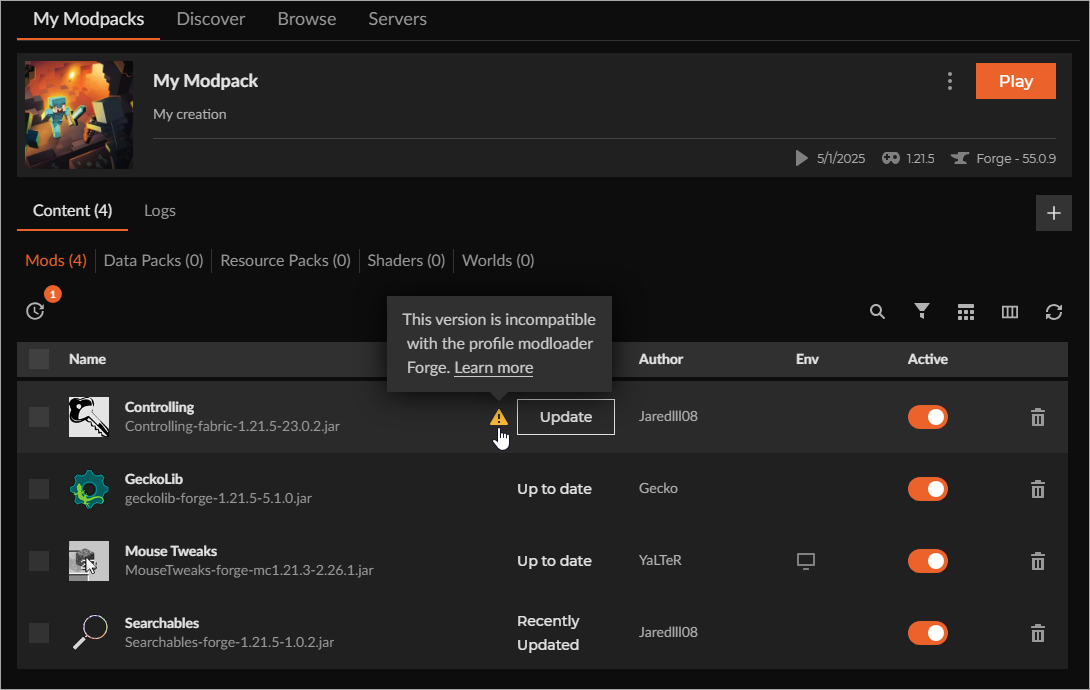
- Check your Minecraft version: Most mods and Forge versions are tied to specific Minecraft versions.
- Download Forge: Go to the official Forge website and download the installer for your Minecraft version.
- Run the installer: Open the Forge installer. Select “Install client” and choose your Minecraft folder.
- Open Minecraft Launcher: After installation, you’ll see a new profile called “Forge.”
- Add mods: Download mods that match your Forge and Minecraft version. Place the mod files in the “mods” folder (found in your Minecraft directory).
- Launch the game: Start Minecraft with the Forge profile. Your mods should load automatically.
Here’s a quick comparison of installing Forge versus another popular mod loader, Fabric:
| Feature | Forge | Fabric |
|---|---|---|
| Installation | Installer, easy process | Installer, simple steps |
| Mod compatibility | Thousands of mods | Growing selection |
| Community support | Large, active | Active, smaller |
| Update speed | Slower for new versions | Faster updates |
Credit: support.curseforge.com
Forge Versions And Compatibility
Forge is available for many Minecraft versions, from 1. 7. 10 to the latest releases. However, mods are tied to specific Forge versions. For example, a mod made for Forge 1. 16. 5 won’t work on Forge 1. 18. 2.
Always check the mod’s requirements before installing.
Developers usually release mods for the most popular Minecraft versions. Some versions, like 1. 12. 2 and 1. 16. 5, have the most mods. If you want lots of choices, pick one of these versions.
Here’s a look at the popularity of Forge versions by number of mods available:
| Minecraft Version | Number of Mods | Community Support |
|---|---|---|
| 1.12.2 | 3,500+ | Very strong |
| 1.16.5 | 2,800+ | Strong |
| 1.18.2 | 1,500+ | Moderate |
| Latest | Varies | Growing |
Common Problems And Solutions
Even with Forge’s reliability, users sometimes face issues. Here are some common problems and how to fix them:
- Game crashes on startup: Usually caused by incompatible mods. Make sure all mods match your Forge and Minecraft version.
- Missing mods folder: If you don’t see a “mods” folder, run Minecraft with Forge once. It will create the folder automatically.
- Mods not loading: Check that mods are .jar files and not zipped folders. Only .jar files go in the mods folder.
- Slow performance: Some mods are resource-heavy. Try using fewer mods or upgrading your computer’s RAM.
A non-obvious tip: If you have many mods, use a tool like Mod Organizer to manage and update them. This prevents conflicts and keeps your game stable.

Credit: www.youtube.com
Forge Vs Other Mod Loaders
Forge is not the only mod loader available. The main alternative is Fabric. Fabric is newer and updates quickly for the latest Minecraft releases. However, Forge still has more mods and a larger community.
Here’s a comparison of Forge and Fabric in terms of modding features:
| Feature | Forge | Fabric |
|---|---|---|
| Mod availability | Wide variety | Smaller selection |
| Performance | Stable, sometimes slower | Lightweight, faster |
| API complexity | More features, complex | Simpler, less features |
| Community size | Large | Medium |
| Update frequency | Slow for new versions | Fast updates |
If you’re new to mods, start with Forge. If you need the newest game version and don’t mind fewer mods, try Fabric.
Creating Mods With Forge
Forge isn’t just for playing mods—it’s also for making them. Developers use Forge’s API (Application Programming Interface) to create custom mods. The API gives access to Minecraft’s code, letting mod makers add new features, blocks, or mechanics.
To create a mod, you need:
- Java programming skills
- Forge API files
- An IDE (like Eclipse or IntelliJ IDEA)
The process involves writing code, testing your mod in Minecraft, and releasing it for others to download. Many famous mods, like Biomes O’ Plenty and JourneyMap, were made with Forge.
A tip for new modders: Start with small projects. For example, try adding a new block or item before making big changes. Also, check the Forge documentation and join forums for help.
Safety And Risks With Forge Mods
Using Forge and mods is usually safe, but there are risks:
- Malware: Always download Forge and mods from trusted sources. Some websites may offer fake files that harm your computer.
- Game corruption: Bad mods can break your save files. Keep backups of your worlds.
- Account safety: Never share your Minecraft account details with mod sites.
To stay safe, use the official Forge website and trusted mod sites like CurseForge or Planet Minecraft. Avoid random links or downloads.
A non-obvious insight: Mods can sometimes collect data or interact with your files. Read the mod’s description and permissions before installing.
Forge And Multiplayer
Many players want to use mods in multiplayer. Forge allows modded multiplayer, but all players (and the server) must have the same mods installed. If you join a server with different mods, you may get errors or be unable to connect.
Some mods are client-side only, meaning you can use them without affecting other players. Others are server-side and require everyone to have them. Always check the mod’s type before joining or running a server.

Credit: www.wikihow.com
Forge Community And Resources
Forge has a strong community that helps users and developers. You can find guides, tutorials, and forums online. Popular sites include Reddit, Minecraft Forum, and CurseForge. The official Forge site has downloads, changelogs, and developer tools.
If you’re stuck, ask questions in forums or Discord channels. The community is friendly and ready to help new users.
For official info, visit Forge’s official site.
Tips For Beginners
If you’re just starting with Forge, here are practical tips:
- Always match your mod and Forge version to your Minecraft version.
- Back up your worlds before adding new mods.
- Start with just a few mods to avoid conflicts.
- Update Forge and mods regularly for bug fixes and new features.
- Read mod descriptions carefully to understand what they do.
- Use trusted sources to download Forge and mods.
A smart tip: Keep a separate Minecraft installation for modded play. This prevents problems if mods break your game.
Frequently Asked Questions
What Is Forge Minecraft Mod Loader?
Forge is a tool that allows players to run mods in Minecraft Java Edition. It acts as a bridge between the game and mods, ensuring they work together without errors.
How Do I Install Forge?
Download the Forge installer from the official site. Run the installer and select “Install client. Open Minecraft and select the Forge profile. Place your mod files in the “mods” folder and launch the game.
Can I Use Forge On Minecraft Bedrock Edition?
No, Forge works only with Minecraft Java Edition. Bedrock Edition uses a different system, and mods are not supported in the same way.
Is It Safe To Use Forge Mods?
Yes, if you download Forge and mods from trusted sources. Avoid random websites and always check mod reviews before downloading.
What Do I Do If My Game Crashes After Installing Forge?
Check that all mods match your Minecraft and Forge version. Remove any incompatible mods and try again. If problems continue, seek help on forums or from the Forge community.
Forge is the gateway to a world of Minecraft creativity. Whether you want new biomes, better tools, or huge gameplay changes, Forge makes it all possible. With strong community support, clear instructions, and thousands of mods, it’s the best way to unlock the full power of Minecraft modding.
Start exploring today and discover what your Minecraft world can become.