

Minecraft is a world full of possibilities. Every time you start a new game, the land, mountains, caves, and villages are different. But there’s a special trick: the seed. A seed is a code that tells Minecraft how to build your world. If you use a certain seed, you get the same world as someone else. This is great for sharing amazing places with friends or finding rare landscapes. For Minecraft PC players, seeds unlock creativity, adventure, and surprises.
Many beginners don’t realize how much seeds can change their game. Some seeds give you easy resources, while others put you in challenging spots. You can explore beautiful biomes, find hidden temples, or even start right next to a village.
With the right seed, you control where your story begins. Let’s dive deep into how seeds work, how to use them, and which seeds are best for Minecraft PC.
What Is A Seed In Minecraft Pc?
A seed is a string of numbers or letters. When you start a new world in Minecraft PC, you can enter this seed. The game uses it to decide where rivers flow, where forests grow, and where villages appear. Every world you play is built from a seed—even if you don’t type one in. If you use the same seed, you get the same world every time.
Seeds can be long or short. They can be random numbers, special phrases, or even your own name. Some seeds are famous because they create amazing worlds. Others are secret codes shared by players who discover something unique. Minecraft seeds are not just codes—they’re the starting point for your adventure.
How To Use Seeds In Minecraft Pc
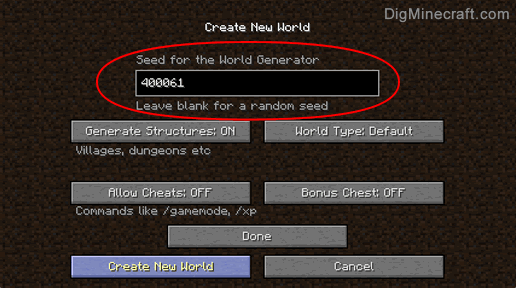
Using seeds is simple, but many people miss one small detail. Seeds only work when you create a new world, not in an existing one. Here’s how you do it:
- Open Minecraft PC and click “Singleplayer.”
- Click “Create New World.”
- On the next screen, click “More World Options.”
- You’ll see a box labelled “Seed for the World Generator.”
- Type your seed (numbers or letters) into the box.
- Set other options (like game mode or difficulty).
- Click “Create New World.”
Now your game loads the world based on the seed you entered.
Important insight: Minecraft updates can change how seeds work. For example, a seed from version 1.16 may look very different in 1.20. Always check that the seed matches your game version.
Credit: www.digminecraft.com
Why Seeds Matter In Minecraft Pc
Seeds are more than just a shortcut. They affect:
- Landscape: Mountains, rivers, caves, and forests change with each seed.
- Biomes: You can start in a snowy tundra, a desert, or a lush jungle.
- Structures: Villages, temples, shipwrecks, and strongholds appear in different places.
- Resources: Some seeds give you diamonds, iron, or rare items close to spawn.
- Challenge: Seeds can make your game easier or harder.
Many players use seeds to find worlds with rare features. For example, a seed might place you next to a village with three blacksmiths. Another might drop you on an island with no trees, forcing you to survive with limited resources.
How To Find And Share Seeds
Finding good seeds is easier than you think. Here are smart ways to discover or share seeds:
- Online Communities: Websites like Reddit, Minecraft forums, and YouTube are full of players posting their favourite seeds.
- Seed Review Sites: Some sites let you search for seeds by biome, structure, or version. They often include screenshots and coordinates.
- In-Game: If you find a cool world, type “/seed” in the game chat (if cheats are enabled) to see your seed.
- Friends: Share seeds with friends so you can explore the same world together.
Non-obvious tip: Many players overlook coordinates. When sharing a seed, include the exact coordinates of interesting features (like villages or temples). This helps others find those spots quickly.

Credit: beebom.com
Best Seeds For Minecraft Pc (2026 Edition)
Minecraft updates often change how seeds work, so here are ten seeds that shine in the latest version (1. 20 and above). Each one offers something special.
1. -561880830
Start in a village surrounded by mountains and a lush valley. There’s a cave nearby packed with resources.
2. -835960947
You spawn next to a massive bamboo jungle, perfect for panda lovers. There’s a ruined portal close by.
3. 776555677
This seed gives you a desert temple right at spawn. There are villages and mineshafts nearby.
4. -385042656
Spawn on a tiny island with no trees. This is a survival challenge for experienced players.
5. 1070383807
You start in a frozen ocean, surrounded by icebergs and snow. A shipwreck is not far away.
6. -237452290
Spawn next to a village with a blacksmith. There’s a ravine filled with ores nearby.
7. -981893330
A lush cave system starts right below your spawn. Perfect for resource hunters.
8. -1249783757
You appear in a rare mushroom biome. Safe from mobs and full of unique features.
9. -305375080
A massive mountain range surrounds your spawn. Waterfalls and caves are everywhere.
10. -826003059
A woodland mansion is very close to spawn, along with a village and a flower forest.
These seeds are tested for Minecraft PC version 1. 20+. If your game is older, you may see different results.
Comparing Seed Features: Mountains, Villages, And Structures
Let’s compare three seeds for their main features. This helps you choose the right one based on what you want.
| Seed | Mountains | Villages | Rare Structures |
|---|---|---|---|
| -561880830 | High peaks, valleys | 1 (at spawn) | Cave with ores |
| -826003059 | Small hills | 1 (close) | Woodland mansion |
| -385042656 | None (island) | 0 | Survival challenge |
Key insight: If you want resources fast, pick seeds with villages and caves. If you want a challenge, choose island seeds.
Types Of Seeds: What Makes A Seed Unique?
Not all seeds are the same. Here are the main types:
- Survival Seeds: Good for easy resources and safe spots.
- Challenge Seeds: Start in tough places, like islands or deserts.
- Resource Seeds: Have villages, temples, or caves nearby.
- Biome Seeds: Special landscapes, like jungles, icebergs, or mushroom islands.
- Structure Seeds: Rare structures (mansions, strongholds) near spawn.
Beginners often miss that some seeds combine several features. For example, a seed might have a village, a temple, and a rare biome all together. Always check the spawn area carefully.
How Minecraft Updates Affect Seeds
Minecraft updates change the way worlds are built. When a new version comes out:
- Biomes can shift.
- Structures can move.
- Resources may appear in new places.
A seed from version 1. 16 will look different in 1. 20. This is important when searching for seeds online. Always match the seed to your game version.
Data point: According to Mojang, the world generator was changed in Minecraft 1.18 to add taller mountains and deeper caves. This made old seeds create new landscapes.
Seed Settings And Game Modes
When you enter a seed, you can also pick game settings:
- Game Mode: Survival, Creative, Hardcore.
- World Type: Default, Superflat, Large Biomes, Amplified.
- Structures: Choose whether villages, temples, and other buildings are included.
These settings affect how your seed works. For example, Amplified makes mountains much taller, changing the landscape.
| World Type | Mountains | Villages | Difficulty |
|---|---|---|---|
| Default | Normal | Normal | Balanced |
| Superflat | None | Rare | Easy |
| Amplified | Extreme | Scattered | Hard |
Advanced Seed Tricks For Minecraft Pc
Once you understand seeds, you can do more advanced things:
- Speedrunning: Many players use seeds to practice fast runs. They pick seeds with villages and temples close to spawn.
- Adventure Maps: Builders use seeds to create worlds for custom maps.
- Roleplay Worlds: Some seeds are chosen for their beauty or story potential.
Pro tip: Use the “/seed” command to check your world’s seed. If you find a great landscape, share the seed with friends or online communities.
How To Test Seeds Before Playing
Testing a seed before starting your main game saves time. Here’s how:
- Create a new world with the seed.
- Explore the spawn area and look for features.
- Use Creative mode to fly around and check biomes, villages, and resources.
- Note interesting coordinates for later.
If the world isn’t what you want, delete it and try a new seed. This lets you find the perfect start for your adventure.
Common Mistakes When Using Seeds
Even experienced players make mistakes. Here are the top ones:
- Wrong game version: Using a seed from an old version in a new game changes the world.
- Typing errors: One wrong number or letter can create a totally different world.
- Not checking coordinates: Some features are far from the spawn. Always check how close villages or structures are.
- Ignoring world type: Picking Superflat or Amplified can change the landscape.
Non-obvious tip: Save your favourite seeds in a notebook or file. This way, you can use them again or share them with others.
Finding Rare Features With Seeds
Some seeds are famous for rare features:
- Multiple villages: Start with two or more villages close together.
- Jungle temples: Rare in some versions, but certain seeds have them near spawn.
- Strongholds: Seeds that put the stronghold close to the spawn are great for speedrunning.
- Mushroom islands: Very rare and safe from mobs.
These features make your game exciting. If you want to try speedrunning, look for seeds with villages and strongholds close by.
Seed Sharing: How To Connect With Other Players
Sharing seeds is a big part of Minecraft culture. Here’s how to do it:
- Post your seed on Minecraft forums or Reddit.
- Make a YouTube video showing your world.
- Join Discord servers and share seeds with friends.
- Include coordinates for cool places (like “Village at x: 100, y:75, z:200”).
External link: For more official info about Minecraft seeds, check the Minecraft Wiki.

Credit: www.youtube.com
Seed Examples: Biomes And Structures
Let’s look at three seeds and what you’ll find near spawn.
| Seed | Biome | Nearby Structures | Resources |
|---|---|---|---|
| -835960947 | Bamboo Jungle | Ruined Portal | Wood, bamboo, melons |
| 1070383807 | Frozen Ocean | Shipwreck | Ice, snow, treasure |
| -1249783757 | Mushroom Island | None | Mushrooms, cows |
How Seeds Help Multiplayer And Creative Play
Seeds are not just for singleplayer. In multiplayer, you can:
- Host a server with a special seed so everyone explores the same world.
- Use seeds to build creative maps with friends.
- Share seeds for adventure or challenge maps.
Seeds let you create shared experiences. You can start with the same landscape and see how each person builds or survives.
Using Seeds For Learning And Practice
Seeds are great for learning Minecraft. If you’re new, start with easy seeds:
- Villages close to spawn for quick resources.
- Flat areas for building.
- Biomes you like (forest, plains, etc. ).
Advanced players use seeds to practice:
- Speedrunning (finding the End quickly).
- Building in tough biomes.
- Surviving on islands.
Pro tip: Try different seeds to see how your skills change. One seed might make you a better builder, another a better survivor.
Seed Customization: Can You Make Your Own?
You can’t fully control every part of a seed, but you can try different codes to get close to what you want. Some players:
- Try random words or numbers.
- Use their name or favourite phrase.
- Change one digit at a time to see how the world changes.
Hidden insight: Some words are “lucky” and create interesting worlds. For example, “diamond” or “dragon” sometimes makes cool landscapes. But there’s no guarantee—a seed’s effect is random.
Seeds And Game Performance
Some seeds create worlds with lots of mountains, caves, or villages. This can affect game performance:
- Large biomes or amplified worlds may lag on older PCs.
- Busy spawn areas with many structures can slow down loading.
If your game is slow, try seeds with simpler landscapes. Avoid Amplified mode unless your PC is strong.
The Future Of Seeds In Minecraft Pc
Minecraft keeps changing. New updates add biomes, structures, and features. This means seeds will always be important. Players will keep sharing, testing, and exploring new seeds.
Data point: Since Minecraft 1.18, seeds can create worlds with higher mountains and deeper caves. The possibilities are endless.
Minecraft may add more seed features in the future, like custom starting items or special structures.
Frequently Asked Questions
What Is A Seed In Minecraft Pc?
A seed is a code (numbers or letters) that tells Minecraft how to build your world. If you use a seed, you get the same landscape every time. Seeds decide where biomes, villages, and structures appear.
How Do I Use A Seed In Minecraft Pc?
To use a seed, start a new world in Minecraft PC. Click “More World Options” and type the seed in the “Seed for the World Generator” box. Your world will be built based on that seed.
Do Seeds Work In All Versions Of Minecraft Pc?
Seeds work in every version, but the world they make can change. Updates like 1. 18, 1. 19, or 1. 20 change how biomes and structures appear. Always check that your seed matches your game version.
Can I Share A Seed With Friends?
Yes! You can share your seed code with friends. If they use the same seed and version, they get the same world. Include coordinates for interesting places to help them find cool features.
Are There Seeds For Special Biomes Or Structures?
Some seeds are famous for rare biomes (like mushroom islands) or structures (like woodland mansions). You can search online for seeds with special features. Always check the version so the seed works as expected.
Minecraft seeds are the hidden key to unlocking new adventures and creative worlds. Whether you want easy resources, rare biomes, or tough survival challenges, the right seed makes all the difference. As Minecraft keeps growing, seeds will stay at the heart of every player’s story.
Try new seeds, share your favourites, and see how your world changes—one code at a time.
Conclusion
Choosing the right Seed for Minecraft PC can completely transform your Minecraft adventure. Whether you’re looking for a survival challenge, a village spawn, breathtaking landscapes, or rare structures, the perfect seed helps you start your journey with exciting opportunities. Remember to use seeds that are compatible with your Minecraft version for the best results. As new updates introduce fresh world generation, experimenting with different seeds is a great way to keep every playthrough unique and enjoyable. Explore, build, and make the most of your Minecraft world with the perfect PC seed.