

Minecraft is a game where every world feels like a new adventure. You dig, build, explore, and sometimes, you find yourself in a landscape that feels just right. But have you ever wondered why each world is different? Or how can some players share the same world as you? The answer lies in something called a seed. If you want to understand Minecraft on a deeper level, learning about seeds is an important step. This article will take you from beginner to expert on the topic of Minecraft seeds—what they are, how they work, and how you can use them to shape your own game experience.
What Is A Seed In Minecraft?
A seed in Minecraft is a unique code, usually a string of numbers (and sometimes letters), that the game uses to generate the world you play in. When you start a new world, Minecraft uses the seed to decide where mountains will appear, where rivers will flow, and how villages are placed. Think of the seed as a recipe. Change the seed, and you get a different world—even if you use the same game version and settings.
For example, if you enter the seed `12345`, every player who uses this seed will see the same world layout. The trees, caves, oceans, and even the locations of rare structures like Strongholds or Woodland Mansions will match exactly. This makes sharing seeds a way for players to discover and explore famous or unusual worlds together.
How Minecraft Seeds Work
Seeds are part of Minecraft’s procedural generation system. This means the game doesn’t store a map of every world. Instead, it uses the seed to create the world from scratch each time you load it. Here’s a simple way to understand it:
- The seed acts as a starting point for the game’s random number generator.
- The generator uses this number to decide the location, shape, and type of terrain.
- Even the smallest change in the seed (like changing one digit) can create a totally different world.
Minecraft seeds can be positive or negative numbers, and sometimes even words. For example, the seed `-890743` and the seed `mountainview` will both create worlds, but with very different landscapes.
Why Seeds Matter For Players
Knowing about seeds opens up new possibilities:
- Finding Unique Worlds: Some seeds create worlds with rare structures near spawn, like a village next to a mushroom biome.
- Sharing Experiences: Friends can play in the same world by using the same seed.
- Challenging Yourself: Some seeds create harsh survival conditions, like starting on a tiny island with no trees.
- Speedrunning: Competitive players use specific seeds to try for the fastest game completions.
Non-obvious insight: Not all seeds work the same way across different Minecraft versions. A seed that creates a beautiful landscape in Minecraft 1.18 might generate something completely different in 1.19. Always check the version before sharing or using a seed.
How To Find And Use A Seed
Using a seed in Minecraft is easy, but the steps differ slightly for Java Edition and Bedrock Edition.
Finding The Seed Of Your World
If you want to share your world with a friend or post it online, you need to find your world’s seed.
Java Edition
- Open your world.
- Press `T` to open the chat.
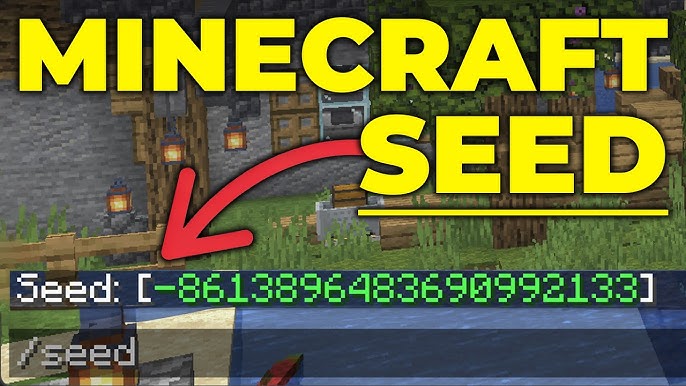
- Type `/seed` and press Enter.
- The seed will appear in the chat.
Bedrock Edition
- Open the world settings from the main menu.
- Scroll down to the “Seed” section. The number shown is your world’s seed.
Using A Seed To Create A World
You can use any valid seed to make a new world:
- Click “Create New World.”
- Look for the “Seed” box (usually under “More World Options”).
- Enter the seed code you want to use.
- Start the game. Your world will match the seed.
Tip: If you leave the seed box blank, Minecraft picks a random seed. You might discover amazing worlds by chance!
Credit: www.youtube.com
Types Of Seeds And What They Do
Not all seeds are equal. Some create worlds full of resources, while others are challenging or beautiful. Here are some common types:
- Survival-friendly seeds: These often have villages, strongholds, or easy access to wood and food near the spawn point.
- Scenic seeds: These generate mountains, valleys, and stunning landscapes, perfect for building.
- Challenging seeds: Some seeds put you in tough spots, like a desert with no water or a small island with few trees.
- Speedrun seeds: These are used by players trying to finish the game quickly. They often have villages, portals, and resources close to spawn.
Seed Format And Limits
Minecraft seeds can be numbers, positive or negative, and even words or phrases. But there are some technical limits.
How Many Seeds Are Possible?
Minecraft uses 32-bit or 64-bit numbers for seeds, depending on the version. That means there are billions of possible seeds. No two seeds are exactly alike unless they are the same number or text.
Numbers Vs. Words
When you enter text as a seed, Minecraft converts it into a number using a system called hashing. For example, the word `apple` becomes a number behind the scenes.
Maximum Seed Value
The largest seed value Minecraft can use is `2,147,483,647` (for 32-bit), but you can enter much bigger numbers in newer versions. If you enter a number outside the range, Minecraft will “wrap” it back around into a valid number.
Non-obvious insight: If you want consistent results, always use numbers for seeds rather than words—some platforms handle text differently.
Seeds And Minecraft Versions
Minecraft is always changing. New updates add blocks, biomes, and structures. This affects how seeds work.
- Java Edition and Bedrock Edition sometimes use different generation rules. The same seed can look very different.
- Major updates (like 1.18 or 1.19) change the world generation engine. Old seeds may not look the same in new versions.
Example: How Seeds Changed
Let’s compare how the same seed can look in different versions:
| Seed | Minecraft 1.16 | Minecraft 1.18 |
|---|---|---|
| 12345 | Flat plains, few mountains | Huge mountains, new caves |
| -456789 | Desert spawn, small river | Lush cave under spawn |
Always check which game version a seed was made for before using it. This is especially important for speedrunners or builders who need specific features.
Sharing And Discovering Seeds
Players often share their favourite seeds online. You can find seeds on YouTube, Reddit, or Minecraft fan sites. Here’s how to get the most from shared seeds:
- Check the version: Make sure your game version matches the seed’s version.
- Read the description: Some seeds are special because of what’s near the spawn point.
- Try the seed yourself: Sometimes, players miss hidden gems like rare biomes just a few blocks away.
There are even websites where you can search for seeds by biome, structure, or feature. For example, you might search for a seed with a jungle temple close to spawn. One trusted source is Minecraft Wiki.
Famous Seeds And What Makes Them Special
Some seeds have become famous in the Minecraft community. Here are a few well-known examples and why they stand out:
- -6120648606982687686 (1.14 Java Edition): This seed spawns you near a giant ravine, a village, and a stronghold—all within a short walk.
- 404 (Beta 1.3): The legendary “404 Challenge” seed puts you above a huge gravel pit that leads to a massive cave. It became a famous survival challenge.
- Herobrine (Classic versions): This seed became popular because of the Herobrine myth, though nothing special happens in the world itself.
- -785056: You spawn on a tiny island with almost no resources, making survival very difficult.
These seeds are shared for their unusual or fun features. Players use them for challenges, building, or just to see something new.
How To Find Your Own Amazing Seeds
Instead of using someone else’s seed, you can search for your own. Here are some methods:
1. Random Generation
Just start a new world and let Minecraft pick a seed. This is the most common way. Sometimes you’ll find something amazing by accident.
2. Seed Finders And Tools
Some websites let you search for seeds with specific features. You can look for seeds with certain structures or biomes near spawn. Tools like Amidst or Chunkbase help visualize seeds before you play.
3. Experiment With Words
Use words or phrases as seeds. Try your name, favourite place, or even random sentences. Sometimes these create interesting worlds.
4. Change One Digit
Change a single digit in a seed you like. Even small changes can create big differences in the world.
Practical example: If you love a world but want more challenge, try increasing or decreasing the seed number by 1. The terrain might change in surprising ways.
Seeds For Multiplayer And Realms
When you set up a multiplayer server or a Minecraft Realm, the seed you use affects the world for all players. This is useful if you want a shared adventure. Keep in mind:
- Once a server is running, changing the seed does NOT change the world. You must create a new world for the new seed to take effect.
- If you use the same seed, all players see the same world layout, but their progress and builds are unique to your server.
Seeds And Game Modes
Seeds work in all Minecraft modes—Survival, Creative, and Hardcore. The only difference is how you play the world:
- Survival: Resource placement matters most.
- Creative: Landscape and terrain for building are important.
- Hardcore: Some players choose harsh seeds for an extra challenge.
Insight: Some seeds are better for certain playstyles. For example, a seed with a large flat area is great for creative builders, while a seed with isolated islands is perfect for survival fans looking for a challenge.

Credit: www.youtube.com
Comparing Seeds: What Makes A “good” Seed?
Not every seed is equal. Here’s a quick look at what players often compare:
| Feature | Why It Matters | Example Seed Benefit |
|---|---|---|
| Village near spawn | Easy resources, trading, shelter | Quick start for survival |
| Rare biomes | Access to unique blocks/plants | Building with bamboo, cocoa, etc. |
| Stronghold location | Speedrunning, finding the End portal | Fast game completion |
| Large caves | More ores, adventure spots | Fun exploration |
When picking a seed, decide what you want most: resources, beauty, challenge, or something else.
How To Share Seeds With Others
If you find a great seed, sharing it is easy. Just copy the seed number (or word) and the game version. Tell others about any special features, like “village at spawn” or “huge cave system under mountain. ” Sharing seeds builds community and lets others enjoy the same world as you.
Best Practices For Sharing
- Always mention the Minecraft version (e.g., 1.19 Java Edition).
- Note if the seed is for Java or Bedrock, as they sometimes generate worlds differently.
- Include coordinates for special features, like “Desert Temple at X: 200, Z: -150.”

Credit: www.reddit.com
Common Mistakes With Seeds
Even experienced players sometimes get confused about seeds. Here are mistakes to avoid:
- Using the wrong version: Worlds can look very different in different versions.
- Ignoring Java vs Bedrock differences: The same seed may not work the same way.
- Not sharing coordinates: If you mention a cool feature, give the location so others can find it.
- Entering long numbers incorrectly: Make sure there are no extra spaces or symbols.
- Thinking seeds change the game rules: Seeds only affect world layout, not game difficulty or mob behaviour.
Advanced Tips For Seed Hunters
If you want to go deeper, here are some advanced seed tips:
- Map tools: Use mapping tools like Amidst or online seed finders to preview worlds before playing.
- Biome blending: Some seeds have rare combinations of biomes—like a jungle next to snow. These are great for unique builds.
- Structure clusters: Advanced players hunt for seeds where multiple structures (villages, temples, strongholds) are close together.
- Speedrun research: Top speedrunners spend hours or days searching for the perfect seed. They use scripts and tools to test thousands of seeds quickly.
The Future Of Seeds In Minecraft
As Minecraft continues to grow, the way seeds work may change. New biomes, structures, and updates can make old seeds feel new again. Mojang, the company behind Minecraft, sometimes tweaks world generation in major updates. This keeps the game fresh and makes finding new seeds always exciting.
Interesting fact: Some seeds discovered years ago became popular again after updates added new features, like caves or mountain ranges, in the same coordinates.
Frequently Asked Questions
What Is The Difference Between A Seed And A World?
A seed is the code that tells Minecraft how to generate a world. The world is the actual map you play on, created from that seed. You can use the same seed to make the same world layout, but what you build or change will be unique to you.
Can I Use The Same Seed In Java And Bedrock Edition?
Sometimes, but not always. Java and Bedrock use different world generation rules. The same seed can create similar terrain but may have different biomes or structures. Always check which edition a seed is for.
Why Does My World Look Different From My Friend’s, Even With The Same Seed?
This usually happens if you are playing on different Minecraft versions or editions (Java vs Bedrock). Updates can change how seeds generate worlds. Make sure you both use the same game version and edition for matching worlds.
Can I Change The Seed Of An Existing Minecraft World?
No. Once a world is created, its layout is locked. Changing the seed in settings will only affect new worlds. To play with a new seed, you must create a new world.
Where Can I Find Interesting Seeds?
You can find seeds on Minecraft forums, YouTube, or fan sites. The Minecraft Wiki is a good place to start, with lists of seeds for different versions and play styles.
Minecraft’s seed system is part of what makes the game endlessly replayable. Whether you want to explore beautiful landscapes, challenge yourself, or share a world with friends, understanding seeds gives you new ways to enjoy the adventure. So next time you start a new world, try out a custom seed—and see where your journey begins.
Conclusion
Understanding Minecraft What Is a Seed is essential for every player who wants to explore the game more effectively. A seed is the unique code that generates your Minecraft world, determining everything from biomes and villages to mountains, caves, and rare structures. By learning how seeds work, you can recreate amazing worlds, share your favourite maps with friends, or start your adventure in the perfect location. Whether you’re a beginner or an experienced player, knowing how Minecraft seeds function will help you get more out of every new world you create.