

Whispering in Minecraft is a simple but powerful way to send private messages to one player without everyone else seeing your chat. Whether you play on a busy server or just want to share something secret with a friend, knowing how to whisper in Minecraft can make your experience smoother and more fun.
This guide will show you exactly how whispering works in Minecraft, including step-by-step instructions, helpful tips, and common mistakes to avoid. You will also find answers to the most common questions at the end.
What Does Whispering Mean In Minecraft?
Whispering in Minecraft is when you send a message to only one player, instead of sharing it with the whole server. This is useful if you want to:
- Give someone private information
- Plan a surprise
- Avoid spamming the public chat
- Ask for help without others knowing
When you whisper, the message appears only for you and the person you are whispering to. Others cannot see it.
Basic Whisper Commands In Minecraft
To whisper, you must use a special chat command. Minecraft offers a few ways to do this, and the main one is the /tell command.
The /tell Command
The most common way to whisper is by typing:
/tell
For example, if you want to say “Meet at the base” to a player named Alex, you would type:
/tell Alex Meet at the base
This sends your message only to Alex. You and Alex will see something like:
[YourName whispers to you: Meet at the base]
Others on the server will not see this message.
Other Whisper Commands
Minecraft also lets you whisper using /msg or /w. These commands work exactly like /tell. For example:
- `/msg Alex Meet at the base`
- `/w Alex Meet at the base`
All three commands do the same thing, so use the one you like best.
Whispering On Different Minecraft Editions
Whisper commands work a bit differently depending on which Minecraft edition you play. Here’s how it breaks down:
| Edition | Command | Notes |
|---|---|---|
| Java Edition | /tell, /msg, /w | All work the same |
| Bedrock Edition | /tell, /msg, /w | All supported in chat |
| Education Edition | /tell | /msg and /w may not work |
Java Edition and Bedrock Edition both support all three whisper commands. Education Edition sometimes only supports /tell.
Step-by-step: How To Whisper To Someone
Here is a simple way to whisper in Minecraft:
1. Open The Chat Box
Press the “T” key (on PC) or tap the chat button on mobile.
2. Type The Whisper Command
Start with `/tell`, `/msg`, or `/w` followed by the player’s name.
3. Write Your Message
After the player’s name, type your message.
4. Send The Message
Press Enter to send your whisper.
Example:
`/msg Alex Watch Out For Creepers`
Alex will see:
[YourName whispers to you: Watch out for creepers]
Quick Whisper Tips
- Names are case-sensitive on some servers.
- If a player’s name has spaces, try using quotes: `/msg “Player Name” Hello!`
- You can use the TAB key (on PC) to auto-complete player names.
Whispering To Multiple Players
By default, you can only whisper to one player at a time. Minecraft does not support group whispers directly, but some servers use plugins to allow this.
If your server has plugins like EssentialsX, you might be able to:
- Use `/msg` with multiple names (e.g., `/msg Alex,Bob Meet at the base`)
- Create private channels for small groups
Check your server’s help commands or ask an admin if you want this feature.
How Whispering Appears In Chat
When you whisper, the game shows a special message format. This helps you know the message was private.
| Sender | Receiver | What Appears in Chat |
|---|---|---|
| You | Other player | [You whisper to Alex: Meet at the base] |
| Other player | You | [Alex whispers to you: Meet at the base] |
| Other players | N/A | No message shown |
This format makes it clear who the message is for and that it’s private.

Credit: www.wikihow.com
Common Mistakes When Whispering
Many new Minecraft players make small mistakes when trying to whisper. Here are the most common ones and how to avoid them:
1. Spelling The Player’s Name Wrong
Double-check the name, or use TAB to complete it.
2. Using The Wrong Command
If `/msg` or `/w` does not work, try `/tell`.
3. Sending To The Wrong Person
Always make sure you type the correct player name before your message.
4. Whispering To Players Who Are Offline
Your message will not be delivered if the player is not online.
5. Not Checking For Plugins
Some servers change how whispering works. Ask an admin if you have issues.
Advanced Whisper Features On Large Servers
Some large Minecraft servers have extra features for private chat. These can include:
- Reply shortcuts: On some servers, you can use `/r
` to reply to the last whisper. - Private channels: Some plugins let you create group chats.
- Message history: Certain mods or plugins keep a log of private messages.
- Ignore/block: Players can block whispers from certain users.
Always check the rules on your server about private messages. Some servers may monitor whispers to prevent cheating or bullying.
Privacy And Safety Tips For Whispering
Whispering is private, but there are a few things to remember:
- Server admins can see all messages: Even whispers, if they check server logs.
- Never share passwords or personal info: Even in a whisper, keep your data safe.
- Report abuse: If someone sends you unwanted or harmful messages, tell an admin.
Remember, whispering is not 100% secret. Use it for friendly chat, not for sharing sensitive information.
Useful Whisper Shortcuts And Tricks
Here are some ways to make whispering easier:
- Auto-complete names: On PC, type part of the name and press TAB.
- Reply quickly: On some servers, use `/r` to reply to the last whisper.
- Use command history: Press the up arrow to repeat your last command.
If you play with the same friends often, these shortcuts can save time.
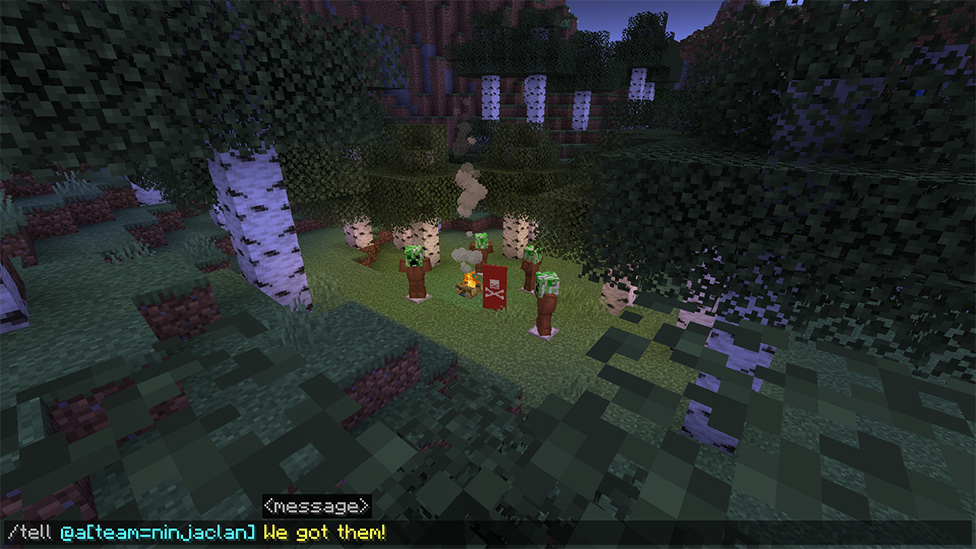
Credit: scalacube.com
Whispering Vs Other Chat Types
Minecraft has several ways to chat. Here’s a quick comparison:
| Type | Who Sees It | When to Use |
|---|---|---|
| Public Chat | Everyone | General announcements |
| Whisper (/tell, /msg, /w) | One player | Private conversation |
| Command Block Chat | Players in a command’s range | Adventure maps, custom games |
| Team Chat (with plugins) | Team members | Organizing in team games |
Whispering is best for one-on-one messages. For groups, look for team chat features.
Whispering In Minecraft Realms
Minecraft Realms is a paid server option for small groups. Whispering works the same way as in normal servers:
- Use `/tell`, `/msg`, or `/w`
- Only you and the receiver see the message
Realms does not support advanced plugins, so you cannot create group whispers there by default.
Whispering On Console And Mobile
If you play Minecraft on console (Xbox, PlayStation, Nintendo Switch) or mobile (iOS, Android), whispering still works. The main difference is how you open chat:
- Console: Press the D-pad right or use the chat button.
- Mobile: Tap the chat icon.
Type the command the same as on PC, for example:
`/tell Alex Meet At The Cave`
Auto-complete may be less reliable on these devices, so double-check player names.
Non-obvious Insights About Whispering
Many players do not know these extra whisper tips:
1. You Can Whisper To Yourself
Type your own name after `/msg`, and you will get a private message. This is helpful for testing or making notes.
2. Whispers Can Be Used In Command Blocks
Adventure map creators use `/tell` in command blocks to send story messages to players without spamming everyone.
3. Color Codes Don’t Work In Whispers By Default
You cannot use Minecraft color codes (like §c for red) in whispers unless a plugin allows it.
4. Whispering Can Be Disabled By Server Settings
Some server admins turn off private messages to prevent cheating. If whispers don’t work, ask your admin.
5. Tab Auto-complete Can Help Avoid Mistakes
Especially on large servers with many players.

Credit: www.youtube.com
Whispering And Minecraft Chat Mods
Many players use mods like OptiFine or LabyMod to change chat appearance. These mods can:
- Make whispers more visible
- Add sound alerts for private messages
- Store a history of whispers
If you play on PC and want to customize chat, look for chat mods that fit your needs. Always check that mods are allowed on your server.
For more details on Minecraft commands, you can check the official Minecraft Commands Wiki.
Frequently Asked Questions
How Do I Whisper To A Player With A Space In Their Name?
If a player’s name has spaces, try using quotation marks:
`/msg “player Name” Hello!`
If this doesn’t work, ask the player for their exact name or try TAB auto-complete.
Can I Whisper To More Than One Player At Once?
By default, you cannot. Whisper commands only send to one player at a time. Some servers with plugins allow group messages, but this is not part of standard Minecraft.
Are Whispers Truly Private? Can Admins See Them?
While whispers are hidden from other players, server admins can see all chat messages in the server logs. Never share passwords or sensitive information, even in a whisper.
Why Can’t I Whisper To Someone?
Check these things:
- The player must be online and on the same server.
- You must spell the name correctly.
- Some servers block whispers or use different commands.
If you still have problems, ask your server admin for help.
What’s The Difference Between /tell, /msg, And /w?
All three commands do the same thing: send a private message to one player. The choice is just personal preference or server rules.
Whispering in Minecraft helps you communicate privately, plan with friends, and avoid crowding the public chat. Whether you play on Java, Bedrock, or a special server, knowing how to whisper makes your Minecraft experience smoother and more social. Try these tips next time you play, and you’ll master private chat in no time.