

Minecraft is more than just a game—it’s a world of endless possibility. Each time you start a new world, you enter a unique landscape created by a seed: a string of numbers or letters that controls the terrain, structures, and biomes you see. For many players, finding the right seed is almost as important as building or surviving. Whether you want a village close by, a rare biome, or challenging terrain, a Minecraft seed finder can help you discover worlds that match your vision. But how do these tools work, and how can you use them to unlock the full potential of your Minecraft experience? Let’s dive deep into the world of seed finders, uncover their secrets, and learn how to use them wisely.
What Is A Minecraft Seed Finder?
A Minecraft seed finder is a tool, website, or program that helps players discover or analyze world seeds. With the right seed, you can generate worlds with specific features—like temples, strongholds, or rare biomes—right where you want them. Seed finders range from simple online databases to advanced software that scans millions of seeds for certain traits.
Most seed finders let you:
- Search for seeds with nearby structures
- Filter by biome, spawn location, or terrain
- Preview maps and layouts
- Copy and share seeds easily
The magic behind seed finders is understanding how Minecraft’s world generation works. Every world starts with a seed, and the game uses this seed to decide where everything appears. Changing the seed changes the entire world.
How Minecraft Seeds Work
Seeds in Minecraft are more than random numbers—they are the DNA of your world. When you enter a seed, Minecraft uses it to generate:
- Terrain features: Mountains, rivers, caves
- Biomes: Forests, deserts, jungles, oceans
- Structures: Villages, temples, mineshafts, strongholds
- Spawn location: Where you start your adventure
If you use the same seed in the same version of Minecraft, you will get the same world every time. However, world generation rules can change between updates, so a seed from version 1. 16 may look different in version 1.
20.
Example: How Seeds Change Worlds
Imagine you want a world with a village near spawn. If you use the seed “12345” in Minecraft 1.18, you might spawn next to a village in a plains biome. But in 1.20, that same seed might put you in a snowy tundra with no village nearby. That’s why it’s important to use seed finders that support your game version.
Types Of Minecraft Seed Finders
There are several kinds of seed finders, each with its own strengths:
- Online databases: Websites where players share and rate seeds, often with screenshots and descriptions.
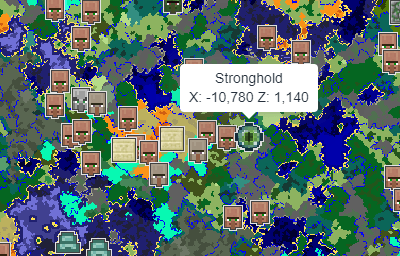
- Interactive maps: Tools that let you explore seeds visually, zooming in and out to find structures.
- Seed analyzers: Software that scans thousands of seeds for specific features, such as nearby strongholds or rare biomes.
- Random seed generators: Tools that create random seeds, sometimes with filters for certain features.
- Mobile apps: Apps for phones and tablets that let you browse and test seeds on the go.
Some seed finders are simple, while others use advanced algorithms to search millions of seeds for the perfect match.
How To Use A Minecraft Seed Finder
Using a seed finder is easy, but getting the most from it requires understanding the process. Here’s a step-by-step guide:
Step 1: Choose Your Game Version
Minecraft’s world generation changes with updates. Always select your version (like 1. 16, 1. 18, 1. 20) before searching for seeds. This ensures accuracy.
Step 2: Decide What You Want
Think about your goals. Do you want a village near spawn? A rare biome? Strongholds close by? Make a list of features you want.
Step 3: Use Filters
Most seed finders let you filter by:
- Biome near spawn (e.g., jungle, desert, plains)
- Structures nearby (e.g., villages, temples, mineshafts)
- Terrain type (e.g., flat, mountainous, islands)
- Spawn location (coordinates, proximity to structures)
Using filters narrows your search and saves time.
Step 4: Preview Seeds
Many seed finders have map previews. Look at screenshots or interactive maps to check terrain, structures, and features. This helps avoid surprises.
Step 5: Copy And Test The Seed
Once you find a promising seed, copy it and enter it in Minecraft when creating a new world. Test it in creative mode first to explore and confirm it matches your expectations.
Step 6: Share And Save
If you find a great seed, share it with friends or the community. Most seed finders let you rate and comment on seeds, helping others discover amazing worlds.
Credit: www.reddit.com
Popular Minecraft Seed Finders
There are many seed finders online, but some stand out for their reliability and features.
- Chunk Base: Offers interactive maps for different structures and biomes. You can enter a seed and see where villages, temples, and other features are located. Supports multiple Minecraft versions.
- Minecraft Seeds: A community-driven site where players share and rate seeds. Includes screenshots and descriptions.
- SeedMap: Lets you browse seeds with map previews and filters. Good for finding rare biomes.
- MineAtlas offers visual maps and structure overlays. Useful for planning builds.
- BiomaFinder: Focuses on biome locations and helps find seeds with rare biomes close to spawn.
- Seed Analyzer: Advanced tool for scanning thousands of seeds for specific traits.
- MCPE Seed Finder: For Minecraft Pocket Edition, it helps mobile players find compatible seeds.
Each tool has strengths. Some are best for structure hunting, others for biomes, and a few offer both.
Comparing Seed Finder Tools
To help you choose, here’s a comparison of three popular seed finders:
| Seed Finder | Supported Versions | Main Features | Ease of Use |
|---|---|---|---|
| Chunk Base | Java & Bedrock (multiple versions) | Interactive maps, structure finder | Very easy |
| MineAtlas | Java Edition | Visual map, biome overlay | Easy |
| Minecraft Seeds | All versions (user submitted) | Seed sharing, ratings, screenshots | Moderate |
Chunk Base is ideal if you want interactive maps and structured locations. MineAtlas is best for biome planning. Minecraft Seeds is great for browsing community picks.
Advanced Features In Seed Finders
Some seed finders offer advanced options:
- Structure proximity filters: Find seeds with villages or temples within a certain distance of spawn.
- Biome rarity search: Locate rare biomes like Mushroom Islands or Ice Spikes.
- Stronghold triangulation: Pinpoint seeds with strongholds near spawn for speedrunning.
- Map overlays: View terrain, biomes, and structures layered together.
- Custom spawn coordinates: Search for seeds with spawn points at specific coordinates.
These features save hours of manual searching. For example, if you want a Woodland Mansion near spawn (which is extremely rare), advanced seed finders can scan thousands of seeds to find one.
Minecraft Seed Finder For Speedrunning
Speedrunners need worlds with specific traits: a stronghold close to spawn, easy access to resources, and often a village for trading. Seed finders help speedrunners by:
- Searching for strongholds within 1000 blocks of spawn
- Identifying villages for quick food and trading
- Locating ruined portals for fast Nether access
- Filtering for desert or plains biomes for easy navigation
Speedrunning communities often share “top seeds” for fast runs. Some seed finders even have speedrunning filters.
Speedrunning Seed Comparison
Here’s a comparison of three seeds popular in speedrunning:
| Seed | Stronghold Distance | Village at Spawn | Ruined Portal Nearby |
|---|---|---|---|
| 42069 | 850 blocks | Yes | Yes (200 blocks) |
| 123456789 | 1200 blocks | No | No |
| 987654321 | 950 blocks | Yes | No |
Seeds with strongholds closer to spawn and villages nearby offer clear speedrunning advantages.
Credit: www.chunkbase.com
Finding Rare Biomes And Structures
Some players want rare biomes—like Badlands, Ice Spikes, or Jungle Edge—near spawn. These biomes are hard to find, but seed finders make it easier.
How Rare Biome Search Works
Seed finders analyze millions of seeds, checking spawn locations and biome maps. They report seeds where rare biomes are within a few hundred blocks of spawn. This is valuable for builders, explorers, and collectors.
Example: Mushroom Island Seeds
Mushroom Islands are one of the rarest biomes. Finding a seed with one near spawn can take hours without a seed finder. With the right tool, you can filter seeds and instantly see maps.
Limitations Of Minecraft Seed Finders
Seed finders are powerful, but they have limits:
- Version sensitivity: Seeds may not work the same across game versions.
- Bedrock vs Java: Some tools support only one edition. Always check compatibility.
- Structure randomness: Certain structures, like strongholds, have random elements even with the same seed.
- Performance: Scanning millions of seeds can be slow, especially on older computers.
- User error: Entering the wrong seed or version can confuse.
Beginners often miss that seeds are case-sensitive and must match the game version exactly. This can lead to unexpected worlds.
Tips For Using Minecraft Seed Finders Successfully
To get the best results from seed finders, follow these tips:
- Check your game version before searching or entering seeds.
- Use filters wisely—don’t search for too many features at once, as this can limit results.
- Preview before playing—always look at map previews or screenshots.
- Test in creative mode—explore the world before committing to survival.
- Save your favourite seeds—keep a personal list for future worlds.
- Share discoveries—help the community by submitting new seeds.
- Double-check coordinates—spawn locations can vary slightly, so confirm distances.
One non-obvious insight: many players forget that biome boundaries can shift slightly between updates, so always check seed previews for your exact version. Also, some seeds produce hidden treasures like buried loot or rare caves that aren’t obvious from surface maps—explore below ground as well.
Minecraft Seed Finder For Builders
If you love building, a seed finder can help you locate worlds with:
- Flat terrain for large structures
- Scenic vistas for creative builds
- Unique landscapes like mountain ranges, lakes, or cliffs
- Multiple biomes close together for diverse materials
Builders often look for seeds with flat plains, dramatic mountains, or islands. Seed finders let you preview terrain before choosing.
Builder-friendly Seed Comparison
Here’s a look at three seeds ideal for building:
| Seed | Terrain Type | Biome Diversity | Structures at Spawn |
|---|---|---|---|
| 11111 | Flat plains | High (5 biomes) | Village |
| 22222 | Mountain cliffs | Medium (3 biomes) | None |
| 33333 | Island | Low (2 biomes) | Shipwreck |
Flat plains are great for large builds, while islands offer unique challenges.
Common Mistakes When Using Seed Finders
Many beginners make mistakes when using seed finders:
- Ignoring game version: Not matching the seed with the Minecraft version leads to different worlds.
- Not previewing terrain: Some seeds look good on paper but have difficult terrain.
- Overlooking spawn coordinates: Starting in the wrong spot can ruin plans.
- Choosing seeds with too many features: Worlds with everything close by can feel unnatural or crowded.
- Not testing before survival: Always explore in creative mode first.
Another mistake is assuming that all seed finders are equal. Some tools have outdated maps or incomplete databases. Always use trusted sites and verify results.
Practical Examples: Using Seed Finders For Different Goals
Let’s look at practical ways to use seed finders:
Example 1: Finding A Desert Temple Near Spawn
Suppose you want a world with a desert temple close to spawn. Set your filters for “desert biome near spawn” and “temple within 500 blocks.” Preview the map, copy the seed, and test it in Minecraft.
Example 2: Searching For Multiple Villages
If you want a world with several villages nearby, use a seed finder’s structure filter. Look for seeds with villages at 0,0 coordinates and others within 1000 blocks. Check the map for terrain and accessibility.
Example 3: Planning A Mega Build
For a mega build, search for “flat plains biome” and “few trees. ” Preview the world, check for lakes or rivers, and make sure the area is big enough. Save the seed and start building.
Minecraft Seed Finder For Multiplayer
In multiplayer, choosing the right seed is crucial. It affects spawn points, world layout, and resources. Seed finders help server admins:
- Find worlds with fair spawn points for all players
- Ensure resources are balanced (wood, ores, food)
- Locate structures for group activities (villages, temples)
- Plan builds and events
Always preview seeds in multiplayer mode to check spawn spread and terrain.
How Seed Finders Support Minecraft Updates
Minecraft updates change world generation. New biomes, structures, or terrain rules can make old seeds obsolete. Seed finders update their databases and maps to match new versions.
When a new update is released:
- Seed finder tools update their filters and maps
- Community shares new seeds with unique features
- Advanced seed analyzers scan for rare biomes or structures added in the update
Always check for tool updates after new Minecraft versions.
Credit: www.youtube.com
Minecraft Seed Finder For Bedrock Edition
Bedrock Edition (used on consoles and mobile) generates worlds differently from Java. Many seed finders support both editions but require separate filters.
Bedrock seed finders focus on:
- Structure locations (which differ from Java)
- Biome placement (sometimes shifted)
- Spawn points (coordinates can be different)
Check tool compatibility and preview maps before choosing a Bedrock seed.
Using Seed Finders For Custom Challenges
Some players create custom challenges—like survival islands, hardcore runs, or adventure maps. Seed finders help by finding worlds with:
- Limited resources (for challenge)
- Unique terrain (islands, cliffs)
- Hidden structures (for exploration)
For example, a survival island challenge needs a seed with a small island, no nearby land, and minimal resources. Seed finders scan for these traits.
The Role Of Community In Minecraft Seed Finding
Seed finders rely on community contributions:
- Players submit new seeds
- Rate and comment on seeds
- Share screenshots and discoveries
- Help identify bugs or errors in seed maps
A strong community means more accurate databases and better seed recommendations. Some sites let you filter by “most popular” or “highest rated” seeds.
Is Using A Seed Finder Cheating?
Some players worry that using seed finders is “cheating. In reality, seed finders are tools. They help you explore, build, and plan. Minecraft is about creativity, and seed finders expand your options. However, for official competitions or speedrun records, rules may restrict seed finder use.
Minecraft Seed Finder Security And Privacy
Most seed finders are safe, but use trusted sites. Avoid tools that ask for personal information or downloads from unknown sources. Stick to popular sites like Chunk Base or MineAtlas.
For more information on Minecraft world generation, visit the official Minecraft Wiki.
Frequently Asked Questions
What Is A Minecraft Seed?
A Minecraft seed is a string of numbers or letters that controls how a world is generated. Entering a seed creates a specific world layout, including terrain, biomes, and structures.
How Do I Find The Best Seeds For My Game Version?
Use a seed finder that supports your Minecraft version. Filter by desired features (biomes, structures) and preview the map before choosing. Always check compatibility between Java and Bedrock.
Can I Use Seed Finders For Bedrock Edition?
Yes, many seed finders support Bedrock Edition. Select Bedrock in the tool’s filters and check map previews for accuracy. Structure locations can differ from Java.
Are Seed Finders Safe To Use?
Most online seed finders are safe. Use trusted sites and avoid downloading unknown software. Never share personal information when using seed finder tools.
What Should I Do If A Seed Doesn’t Match The Preview?
Double-check your game version, edition (Java or Bedrock), and seed entry. Small mistakes can change the world. If problems continue, try another tool or update your game.
Minecraft seed finders open up a world of possibilities. Whether you’re hunting for rare biomes, planning builds, or chasing speedrun records, these tools help you create worlds tailored to your goals. By understanding how seeds work and using seed finders wisely, you can unlock the hidden beauty and adventure waiting in Minecraft.
Remember to check your version, preview maps, and share your discoveries with the community. Your perfect world is just a seed away.