

Minecraft is much more than just a game—it’s a world of possibilities. Each time you start a new world, Minecraft creates a unique landscape. This landscape depends on a seed: a string of numbers or letters that shapes the terrain, villages, biomes, and resources you’ll find. But how do you explore or plan your world before even entering it? That’s where the Minecraft seed map comes in. With seed maps, you can preview your world, find rare structures, and strategize before mining your first block.
Understanding Minecraft seed maps can transform your gameplay. Whether you’re a builder, explorer, or speedrunner, knowing what’s ahead gives you a serious advantage. Let’s dive deep into what Minecraft seed maps are, how they work, and why they matter so much.
What Is A Minecraft Seed Map?
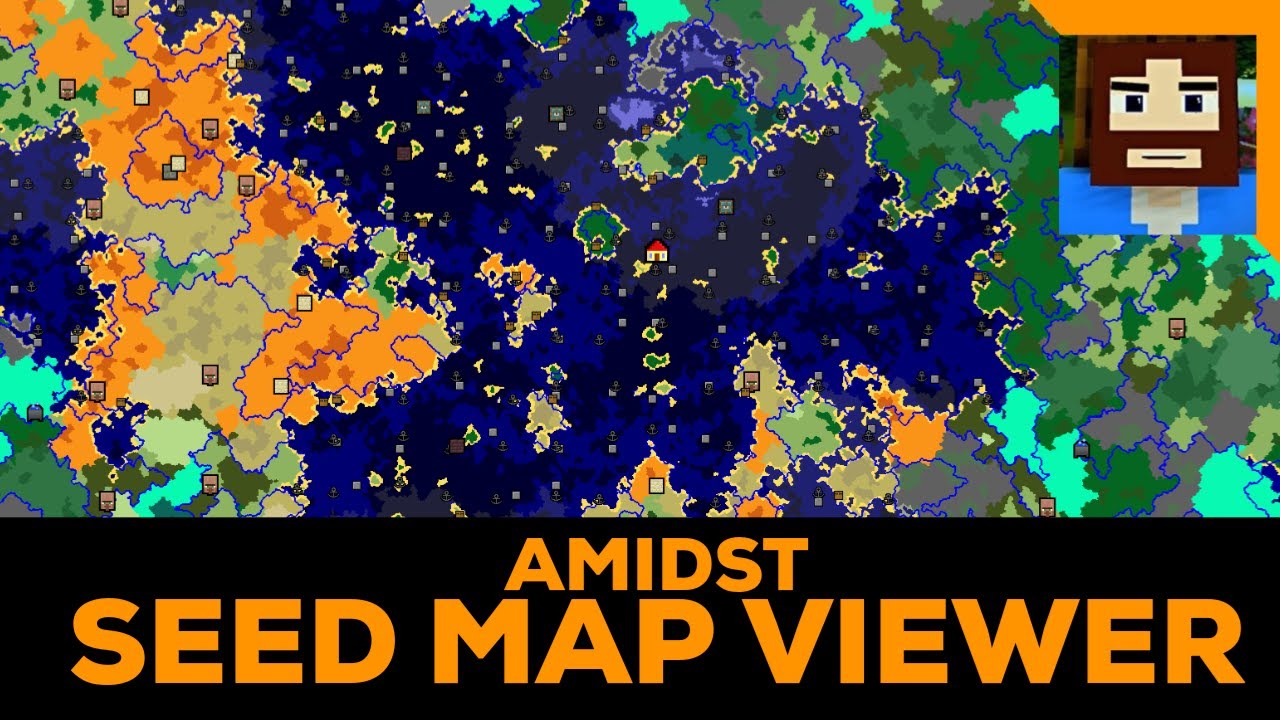
A Minecraft seed map is a visual representation of a world generated from a specific seed. It shows the layout of biomes, villages, temples, strongholds, and other features. Players use seed maps to explore terrain before playing or to locate important resources.
Seed maps can be created using online tools. These tools analyze the seed and generate a detailed map. This lets you see the world’s structure—where to find deserts, oceans, jungles, or rare structures.
Many players mistakenly think that seeds only affect terrain. In reality, seeds control nearly every feature in your Minecraft world, from mountain shapes to cave networks to the placement of structures.
Key Terms Explained
- Seed: A unique code that shapes the world in Minecraft.
- Biome: A region in Minecraft with its own climate, plants, and animals.
- Structure: Man-made or natural buildings like villages, temples, or strongholds.
- Seed map tool: An online program that creates a visual map from a seed.
How Minecraft Seeds Work
When you start a new world, Minecraft asks for a seed. If you don’t enter one, the game generates a random number. This seed controls every aspect of your world’s layout.
Even a small change in the seed creates a completely different world. For example, the seed “12345” will not look like “12346. The game uses the seed to decide where biomes, structures, and resources appear.
Seed Generation Process
- Input: You type in a seed or let Minecraft choose one.
- Algorithm: Minecraft uses a mathematical formula to turn the seed into world data.
- World Creation: The game builds terrain, biomes, and structures based on the seed.
This process is consistent—if two players use the same seed and game version, their worlds will be identical.
Types Of Seeds
- Random seeds: Created when you don’t enter any seed.
- Custom seeds: Entered by the player, often shared online for special worlds.
- Famous seeds: Popular seeds known for rare features, like multiple villages or rare biomes.
Why Use A Seed Map?
Knowing your world before you enter it can change your Minecraft experience. Seed maps give you a preview of what’s waiting. Here are some reasons to use a seed map:
- Locate villages and structures: Find where villages, temples, and strongholds are before you play.
- Plan builds: See where mountains, lakes, or flat areas are for building bases.
- Find rare biomes: Spot jungles, mushroom islands, or ice spikes quickly.
- Speedrunning: Speedrunners use seed maps to optimize their routes and beat the game faster.
- Resource management: Identify where to find resources like diamonds, iron, or lava pools.
Many beginners overlook the power of seed maps. Planning your world saves time and helps avoid common mistakes, such as building a base far from resources.
Top Minecraft Seed Map Tools
Several online tools help players generate and analyze seed maps. They range from simple visualizers to advanced mapping systems. Below is a comparison of three popular seed map tools.
| Tool Name | Features | Game Version Support | Ease of Use |
|---|---|---|---|
| Chunkbase | Biomes, Structures, Strongholds, Villages | Java & Bedrock | Very Easy |
| Minecraft Seed Map | Biome Finder, Structure Locator | Java Only | Easy |
| MineAtlas | Basic Biome Map, Structures | Java Only | Moderate |
Chunkbase
Chunkbase is one of the most widely used seed map tools. You enter your seed, select the game version (Java or Bedrock), and the tool generates a detailed map. It shows biomes, villages, strongholds, and more.
Minecraft Seed Map
This tool focuses on biome finding and structure locating. It is simple to use and offers clear visuals, but it mostly supports Java Edition.
Mineatlas
MineAtlas provides a basic map of biomes and structures. It’s great for quick previews but lacks some advanced features.

Credit: www.reddit.com
How To Use A Minecraft Seed Map Tool
Using a seed map tool is straightforward, but many beginners miss key steps. Here’s a step-by-step guide:
- Find your seed: Start your world, press F3 (Java Edition) or use the /seed command to see your seed.
- Copy the seed: Write it down or copy it digitally.
- Choose a tool: Go to Chunkbase, Minecraft Seed Map, or MineAtlas.
- Enter the seed: Paste the seed into the tool’s input box.
- Select game version: Make sure you choose the right Minecraft version.
- Analyze the map: Look for biomes, structures, and resources.
- Plan your strategy: Decide where to build, explore, or mine based on the map.
Some players skip the game version step, which can cause inaccurate maps. Always check the version for the most reliable results.
Seed Map Features: Biomes, Structures, And More
Seed maps show much more than just terrain. Here are the main features to look for:
Biomes
Biomes are regions with unique landscapes, plants, and animals. Common biomes include plains, deserts, forests, and jungles. Rare biomes like mushroom islands or ice spikes are valuable for resources and unique mobs.
Structures
Structures are buildings or ruins placed by the game. Examples are:
- Villages: Good for trading and resources.
- Temples: Often contain loot and traps.
- Strongholds: Needed to reach the End dimension.
- Mineshafts: Full of resources and dangers.
Resources
Seed maps can show the location of ores, lava pools, and caves. This is helpful for mining and survival planning.
Spawn Point
The spawn point is where you start the game. A seed map shows its position relative to key features.
Comparison Of Structure Density
Some seeds have many villages or temples close together. Others have rare biomes spread far apart. Here’s a simple comparison:
| Seed | Villages (within 1000 blocks) | Temples (within 1000 blocks) | Rare Biomes Nearby |
|---|---|---|---|
| 12345 | 5 | 2 | Mushroom Island |
| 67890 | 3 | 1 | Ice Spikes |
| 24680 | 7 | 4 | Jungle |
Credit: www.youtube.com
Planning Your Minecraft Adventure With Seed Maps
Seed maps are not just for curiosity—they’re powerful tools for planning. Many advanced players use seed maps to decide:
- Where to build their base
- Which direction to explore first
- How to reach strongholds quickly
- Where to find rare animals or plants
Strategic Base Placement
If you want a base near resources, check the seed map for nearby villages, caves, and forests. Builders often choose flat biomes like plains, while explorers may prefer mountain or jungle areas.
Exploring Efficiently
Knowing the layout helps you avoid wasted travel. For example, if the nearest village is 2000 blocks away, you can prepare for the journey. Speedrunners use seed maps to cut down time and avoid dead ends.
Resource Gathering
Some biomes are rich in resources. Mineshafts are good for ores; villages offer food and trade. Seed maps show these features so you can gather materials faster.
Seed Maps For Multiplayer Servers
Seed maps are useful for solo play, but even more important for multiplayer servers. When many players share a world, planning is essential.
- Shared resources: Players can see where resources are and plan to avoid conflicts.
- Community builds: Large projects like cities or monuments need careful placement.
- Adventure maps: Multiplayer teams can plan routes and challenges.
Server owners often use seed maps to design spawn areas, set up events, and balance gameplay.
Minecraft Seed Map For Bedrock Vs Java Edition
Minecraft has two main editions: Java and Bedrock. Seed maps behave differently in each.
Java Edition
- Supports most seed map tools.
- Seeds are consistent across computers.
- Structures and biomes are predictable.
Bedrock Edition
- Some seed map tools support Bedrock.
- Bedrock worlds can vary slightly between devices.
- Not all features are mapped perfectly.
Here’s a comparison:
| Edition | Seed Map Tool Support | Consistency | Features |
|---|---|---|---|
| Java | Wide Support | High | Biomes, Structures, Ores |
| Bedrock | Moderate Support | Medium | Biomes, Some Structures |
If you play on Bedrock, always check if your seed map tool supports your device.
Famous Minecraft Seeds And Their Maps
Some seeds are famous for their amazing worlds. Here are three examples:
- -6120648606982681616: This seed creates a world with a village, temple, and pillager outpost next to spawn. It’s popular for speedrunning.
- -7866897547630675894: Known for a rare mushroom island near spawn and several villages.
- -173880667569258021: Features a massive jungle with temples and rivers.
Players share these seeds online, often with seed maps that show special features. You can find more famous seeds on community sites or forums.
How Seed Maps Help Builders And Redstone Engineers
Builders and Redstone engineers use seed maps to plan projects. For example, if you want a giant farm, you’ll need flat land and access to villages. Seed maps show where to find these.
Redstone engineers look for strongholds, mineshafts, or slime chunks—areas where certain mechanics work best. Seed maps reveal these locations, saving hours of searching.
Practical Tips For Builders
- Use seed maps to find rare biomes for unique builds.
- Plan paths between villages for trading networks.
- Look for river systems for docks or bridges.
Common Mistakes Beginners Make With Seed Maps
Even experienced players can make mistakes when using seed maps. Here are some pitfalls to avoid:
- Ignoring game version: Make sure your tool matches your Minecraft version.
- Not checking coordinates: Always look at the map’s coordinates to avoid getting lost.
- Assuming structures are always present: Some structures may not appear in every version.
- Building too far from resources: Don’t set up your base in a resource-poor area.
- Skipping map updates: Minecraft updates can change terrain and structures. Recheck your seed map after updates.
Credit: www.reddit.com
How To Share Seed Maps With Friends
Sharing your seed map is easy and helps others plan their adventures. Here’s how:
- Copy the seed code: Use the /seed command in-game.
- Generate the seed map: Use a tool like Chunkbase.
- Save the map: Download or screenshot the map.
- Send to friends: Share via email, chat, or social media.
Some tools let you generate a link to the map, making sharing even simpler.
Minecraft Seed Map For Speedrunning
Speedrunners use seed maps to plan the fastest route to finish the game. They look for:
- Villages near spawn for resources
- Temples or portals for quick access
- Strongholds close to spawn
Seed maps help speedrunners avoid wasted time and improve their records.
Advanced Speedrunning Strategies
- Practice routes using seed maps.
- Memorize key coordinates for portals and strongholds.
- Use map overlays for quick navigation.
Speedrunning communities often share seeds and seed maps to help each other.
Minecraft Updates And Seed Map Accuracy
Minecraft updates change the way worlds are generated. New biomes, structures, or mechanics can appear. This affects seed maps.
Always check your tool’s version. If Minecraft updates, seed maps may become inaccurate. Many tools update quickly, but some lag behind.
If you want reliable results, use tools that support the latest game version. For more information about Minecraft updates, visit the official Minecraft Wiki.
Practical Examples: Using Seed Maps In Real Gameplay
Let’s look at some real-world scenarios where seed maps make a big difference.
Example 1: Building A Mega Base
You want to build a massive base, but you need flat terrain and resources nearby. A seed map shows:
- Flat plains for building
- Villages for trading
- Forests for wood
By planning with a seed map, you avoid moving your base later.
Example 2: Hunting Rare Biomes
You’re searching for a mushroom island. Without a seed map, you might wander for hours. With the map, you spot the island’s location and plan your route.
Example 3: Multiplayer Planning
Your server wants to build a city. The seed map shows where rivers, mountains, and villages are. Players decide on the best location, avoiding resource conflicts.
How Seed Maps Support Education And Creativity
Minecraft isn’t just a game—it’s used in schools and creative projects. Teachers use seed maps to design lessons, while artists plan builds for exhibitions.
- Educational planning: Teachers can place lessons in specific biomes.
- Art projects: Artists use seed maps to find dramatic landscapes.
Seed maps help turn ideas into reality, making Minecraft a tool for learning and creativity.
Advanced Seed Map Features
Some tools offer advanced features beyond basic maps:
- Slime chunk locator: Find areas where slimes spawn, important for Redstone builds.
- Ocean monument finder: Spot rare structures for advanced challenges.
- Nether and End maps: Preview dimensions beyond the Overworld.
These features are valuable for experienced players and those planning complex projects.
The Future Of Minecraft Seed Maps
As Minecraft evolves, seed maps become more sophisticated. New tools offer 3D previews, coordinate tracking, and custom overlays.
Players demand more accuracy and features. Developers respond by updating tools and adding new options. In the future, seed maps may support mods, custom biomes, and community sharing.
Frequently Asked Questions
What Is A Minecraft Seed?
A Minecraft seed is a code made of numbers or letters. This code creates the unique world you play in—controlling terrain, biomes, and structures.
How Do I Find My Minecraft Seed?
You can find your seed by typing /seed in the chat (Java and Bedrock Editions). In Java, pressing F3 also shows your seed.
Can I Use The Same Seed Map For Java And Bedrock Edition?
Not always. Some seed map tools support both, but world generation can be different between versions. Always check your tool’s compatibility.
Are Seed Maps Always Accurate?
Seed maps are usually accurate if you match the tool’s version with your game. Updates can change accuracy, so check for tool updates after a new Minecraft release.
How Do I Share A Seed Map With Friends?
Generate the map using a tool, save or screenshot it, and send it by email, chat, or social media. Some tools let you generate a shareable link.
Minecraft seed maps unlock a new level of planning and creativity. Whether you’re a builder, explorer, or speedrunner, knowing your world in advance gives you an edge. Try a seed map tool before your next adventure, and discover how much easier—and more fun—Minecraft can be.